As part of our ongoing efforts to provide customers with the most stable and seamless service release experience, we revamped our release process. Service releases now utilize a staggered deployment schedule over a period of time. With this revamped process, customers should expect new features and bug fixes to be gradually applied to our global customer base.
If you don’t see a new feature immediately following our monthly release, you will soon, unless the feature must be enabled by your account manager.
The April release offers some exciting new functionalities such as Delegated Admin! This frequently requested feature allows you to limit administrative access by granting customizable granular privileges within Users, Apps, and Roles. April's security enhancements continue with Device Trust Check which allows admins to prompt for a user certificate, Single Logout for Trusted IdP, and the ability to require reCAPTCHA to block bot attacks.
We also created a direct link for account unlock, added two attributes to the Namely Directory Connector, improved user licensing, and fixed customer reported bugs.
Without further ado, here's what happened in April at OneLogin!
Security & Authentication
Device Trust Check
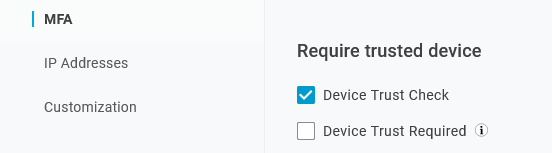
We added a Device Trust Check field in User Policies that provides admins with the ability to prompt for a user certificate, but doesn't require a certificate to log in. If the user is prompted and doesn't submit a certificate, the user can log in. This field provides the end user with the opportunity to submit a PKI or 3rd party certificate.
Note: Contact your account manager to enable this feature.
If you select Device Trust Check and MFA Bypass for Trusted Devices, then a user on a single policy is prompted for MFA on personal devices, but isn't challenged on corporate devices.
To configure MFA Bypass, go to Security > Policies > New User Policy > MFA tab and select Device Trust Check.
To learn more about User Policies, see User Policies.
Single Logout for Trusted IdP
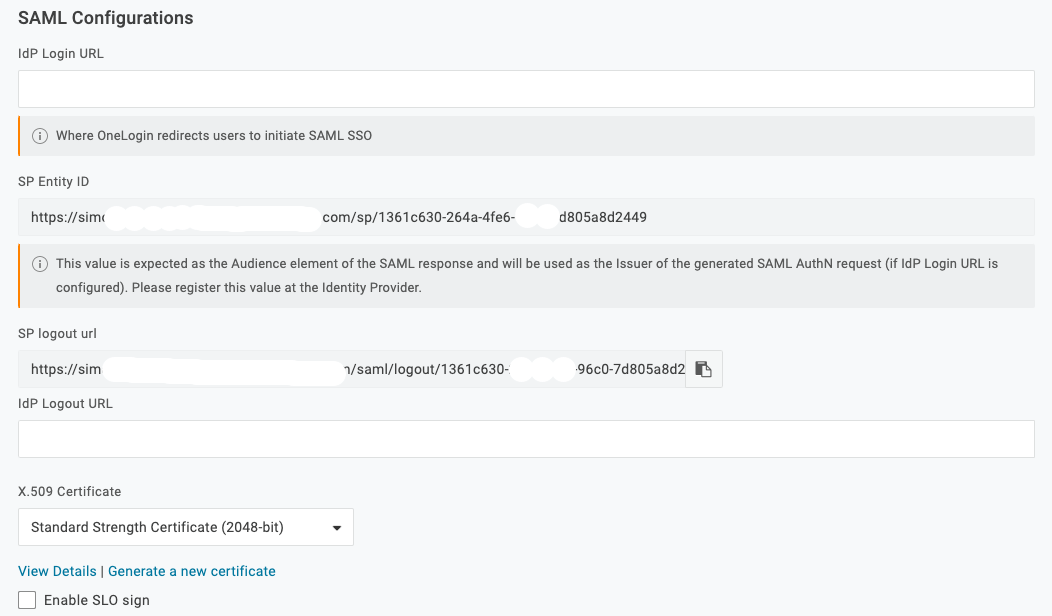
OneLogin's Trusted IdP configuration now supports SAML Single Logout. If a user logs in with an IdP that supports SLO, then we provide a hub that logs the user out of the configured IdP.
For the initial session termination, OneLogin gives precedence to the configured Trusted IdP used to log in, then proceeds to the subsequent apps that support single logout.
Note: SLO is only available for SAML based IDP configurations.
To configure Trusted IdP SLO, go to Authentication > Trusted IdPs > Settings and enter the SAML based Logout URL.
We offer support and validations for:
- OneLogin
- Ping
- HTTP-redirect, but not post bindings.
Note: The SLO chain terminates if any app or IdP fails to respond. SLO isn't a 100% reliable strategy to terminate user sessions across all services. Since there are potential failures, we recommend this as part of an overall solution to manage user sessions.
To learn more about Trusted IdP, see Trusted IdP (Relying Party Trust).
Custom URL for Login
If you create Custom URL links, we now prepend the custom links to the default links on the login page. For example, if you create two custom links named Unique Site and Alternative Sign in, they would appear as follows:
Unique Site | Alternative Sign in | Forgot Password | Help
To learn more about Custom URLs, see Branding.
Direct Link to Self-service Unlock
For org's on Multi-step Login, onelogin.com/login2#action=unlock_account is the direct link for self-service account unlock.
Note: The user must be on a user policy that allows account unlock.
Authentication Factors
We changed the name of the RSA SecurID authentication factor to RADIUS. This factor supports RSA SecurID and OneSpan.

Security Enhancements
You can require users to complete reCAPTCHA before they update their passwords or unlock their account. This feature increases your org's security by blocking bot attacks.
To require reCAPTCHA for password updates or account unlock, go to Security > Policies > New User Policy or select an existing policy > Account Recovery and check Require reCAPTCHA.

To learn more about User Policies, see User Policies.
General Improvements
-
We changed the way the Freshservice app applies the firstname class.
-
We improved the way user licensing works with changes to the user's active status.
-
The way user schemas are matched against user parameters was upgraded.
Bug Fixes
-
If a user makes an SP initiated request & Smart Flows is enabled, the user is now subject to the flow defined in the user policy.
-
If you select Allow users to unlock their accounts and/or Allow users to unlock their accounts on the Account Recovery tab in a user policy, MFA factors are now presented.
-
User policies that use Passwordless flow must now require passwords to never expire by setting Password Expiration = 0.
-
Users without an email address can now enroll in Yubikey.
-
We fixed an intermittent bug related to Markdown text and password resets.
-
We fixed a bug that prevented admins from altering Google alias values.
Directories
-
We added two attributes to the Namely Directory Connector, department and division.
-
For Update directories, username and email are no longer required.
-
We released LDAP Directory Connector 2.3.22 earlier this month. For more information, see Release Note: LDAP Directory Connector 2.3.22 - April 7, 2021.
Manageability & Reliability
Delegated Admin
We released the Delegated Admin feature to an early test group. Delegated Admin allows super users and above to grant granular administrative privileges to users. With Delegated Admin, IT administrators can assign simpler IT tasks to others in the organization while maintaining their security-first values.
To enable the feature, contact your OneLogin account manager.
To learn more about this feature, see Delegated Admin.
Bug Fixes
We clarified the language displayed when a user clicks Change Password on the new profile.
API
Bug Fixes
-
On the MFA v2 API, the verifications endpoint no longer returns a 404 if there is a trailing / in the request.
-
Unlicensed users can now log out.
-
A login denied event is now logged when a Pre Authentication Smart Hook is used to deny access to a user.