OneLogin’s cloud identity platform is a comprehensive solution for managing user identities both in the cloud and behind the firewall. OneLogin integrates with cloud and on-premise apps using SAML, WS-Federation, OpenID, and web services to provide:
- Single sign-on for web, mobile, and iPad
- User provisioning with entitlements
- Multiple directory integration--including Active Directory, LDAP, Google Apps, Workday, Namely, UltiPro--with real-time user sync
- Multi-factor authentication
- Integration with third-party OTP solutions from RSA, Symantec, VASCO, and others
OneLogin comes pre-integrated with thousands of applications and multiple authentication methods, directories, VPNs, and SAML tools, so you can get up and running in minutes with no professional services required.
This article provides an overview of what OneLogin does and how it works. If you just want to get your organization up and running on OneLogin right away, see Getting Started with OneLogin.
Authentication
When you use OneLogin as your identity and access management provider, your users sign into OneLogin and OneLogin takes care of authentication for all of their applications, whether in the cloud or behind the firewall, either using a federation protocol like SAML to pass a token to the app or sending the encrypted user authentication data needed by the app for form-based authentication.

If an application requires form-based authentication, OneLogin stores the user's application login ID and password securely in the cloud and passes them to the application's login page.
If an application's authentication requests are handled by a federated authentication protocol like SAML, OneLogin passes a token that includes user identity data and a signed certificate to the app service provider, which validates that the user is an authorized user and that the certificate matches the public certificate that your organization provided during initial setup of the OneLogin connection to the app. Federation protocols like SAML work equally well for browser-based applications behind the firewall and in the cloud. For more information about how SAML-based federation works, see Introduction To OneLogin's SAML Toolkits.
OneLogin can also authenticate users to apps using WS-Federation, RADIUS, OpenID, the OneLogin Federated Authentication API, and some application-specific proprietary SSO APIs.
If OneLogin doesn't support an app that you use, OneLogin provides tools to create a custom connector.
For more information, see Managing Apps.
Directory integration
Typically, users are synced to OneLogin from one or more third-party user directories, like Active Directory, LDAP, Google Apps, or HR systems like Workday and Namely. When users are created, updated, or deleted in any of these directories, the changes are automatically imported into OneLogin. Likewise, if you create, delete, or update users in OneLogin, those changes can be pushed back to the third-party directories.

Active Directory is the most common directory service used by OneLogin customers. OneLogin uses a lightweight Active Directory Connector (ADC) behind the firewall to communicate between AD services and the OneLogin directory service over SSL/TLS, enabling real-time synchronization of users and user attributes. Any attribute changes (like password, group membership, or status) or new users in Active Directory are synchronized in real time to OneLogin, and any user changes in OneLogin can be synchronized in real time to Active Directory. The OneLogin Active Directory integration also enables you to pull from multiple AD forests and domains through a single connector and provide passive connectors to replica AD instances for high availability.
LDAP integration works in a manner similar to AD, with a connector running in a Java runtime environment on the LDAP host machine. Google Apps directories are synchronized with OneLogin using OAuth and HTTPS. Or you can use Workday as your user directory by connecting OneLogin to the Workday Reports web service, putting OneLogin in the position of identity provider or pushing user changes through OneLogin into AD.
OneLogin gives you the ability to synchronize users from all of these directories, with OneLogin as your unified, secure directory, managing access to all of your cloud and on-premise applications for all of your users' devices.
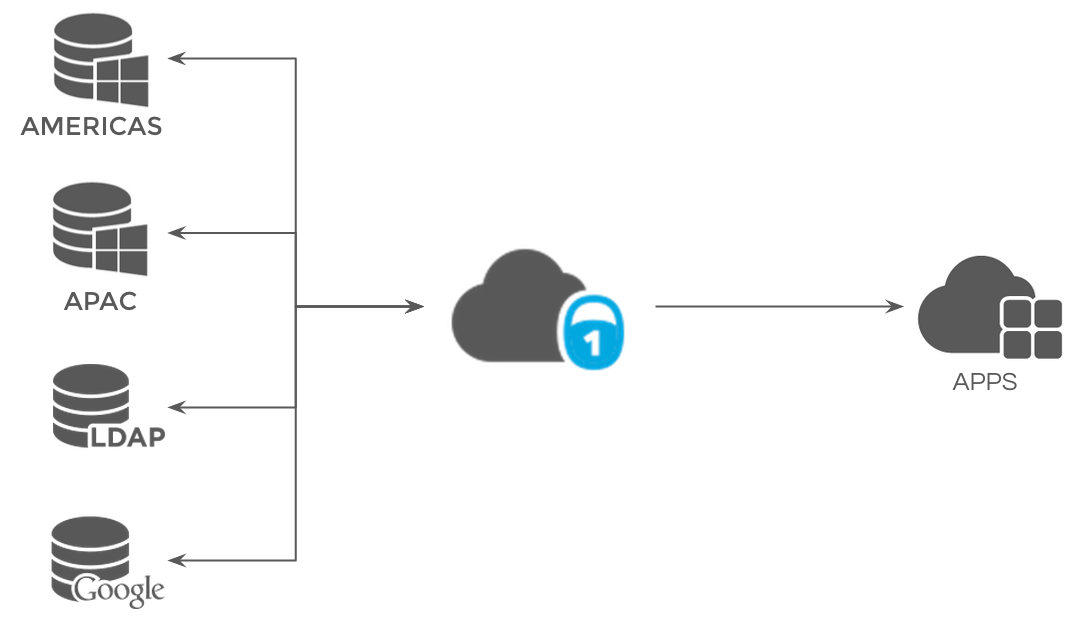
OneLogin allows you to dispense with other directory services entirely, managing all identity and access management tasks required by the typical enterprise, including user provisioning and de-provisioning, single sign-on, and policy management.
For more information, see Directory Integration.
Provisioning
OneLogin makes it easy to create, update, and delete users in the applications that your organization uses. This means that you can quickly add new users to multiple apps and de-provision users from those apps instantly when they change roles or leave your organization.
In a typical workflow, you set up OneLogin to map an app's entitlement definitions to OneLogin attributes (such as roles, which are like Active Directory groups -- and can be mapped to Active Directory groups). When you add a OneLogin user to a role that is associated with entitlements within the app, that user is automatically provisioned to the app, with the proper entitlements.

When it's time to de-provision the user from their apps, you simply disable the user in your directory (either OneLogin or a third-party directory like Active Directory), and the user's accounts in all OneLogin-managed apps will be deleted or suspended, depending on your configuration preferences. If a user is changing roles within the organization, you can provision them to new apps and de-provision them from the apps associated with their old role simply by changing their directory attributes (like role in OneLogin or group in AD).
Not all apps support provisioning through OneLogin, but OneLogin supports SCIM (System for Cross-domain Identity Management), a provisioning standard that provides full support for creating, deleting, and updating users in any cloud or on-premise app.
For more information, see Introduction to User Provisioning.
Windows Domain Authentication
OneLogin's Windows Domain Authentication (WDA) uses Integrated Windows Authentication (IWA) to sign users into OneLogin automatically once they have signed into their Active Directory domain. You define a specific range of IP addresses from which your users can authenticate with OneLogin automatically. This means that they can access any applications that are managed by OneLogin without having to re-enter their credentials, whether those applications are in the cloud or behind the firewall.
Multifactor authentication
Multiple authentication factors prevent unauthorized users from accessing corporate data with passwords alone. OneLogin lets you configure policies that require users to supply additional authentication, like one-time passwords (OTP), when they sign into OneLogin, depending on their location, privilege level, and the app they are trying to access. OneLogin provides a free OTP app for smartphones that displays a generated, short-lived password for additional authentication when, for example, your users are working outside of your firewall. Users can either enter the password in a secondary authentication field on the OneLogin sign-in page, or have OneLogin OTP send the password from the phone with one click. The smartphone simply has to be registered with OneLogin--which users can do themselves. Onelogin also provides OTP delivery via SMS, automatic password reset via email, and integration with Duo Security, RSA SecurID, and many other MFA providers.

In this figure, a user outside the firewall (1) requests access to a cloud app, which results in (2) a request to authenticate to OneLogin, which (3) prompts the user for a one-time password (OTP) as a secondary authentication factor. The user opens OneLogin OTP on their registered smartphone and (4) clicks Send to provide the OTP to OneLogin, which (5) gives the user access to all of their OneLogin-managed apps.
For more information, see Multifactor Authentication and OneLogin Mobile.
Mobile
OneLogin Mobile provides pin-based single sign-on for all of your OneLogin-managed apps from your smartphone or tablet. Web apps run inside OneLogin Mobile, which means that you can switch between apps with a swipe of the finger, and they do not leave behind a trail of URLs, passwords, or cookies on the smartphone's regular browser. OneLogin Mobile requires no particular administrative setup; users simply download the app from the Apple, Android, or Windows Phone app store, provide their OneLogin credentials, and establish their four-digit pin code.
For more information, see OneLogin Mobile.
High-availability and security infrastructure
All OneLogin artifacts are stored securely and with high availability, using built-in redundancy at every tier: DNS, data center, application servers, and database servers. We have redundant residencies in North America as well as Europe, with primary and secondary data centers synchronized in real time, enabling complete failover.