Introduction
OneLogin offers many types of application integrations (SAML, OIDC, OAuth, WS-Federation, Forms-based, Header-based) that can be accessed in one of three ways:
-
Accessing the target application via browsing or selecting a bookmark/link - which invokes an SP-initiated type of flow.
-
Accessing the OneLogin portal and clicking an app tile - which invokes an IdP-initiated type of flow (although OneLogin configuration of the tiles can make this behave as an SP-initiated type of flow).
-
By clicking a launch link that's a specially formatted URL that can be hosted on any portal - this initiates an IdP-initiated type of flow, and in SAML terminology is referred to as an Intersite Transfer URL.
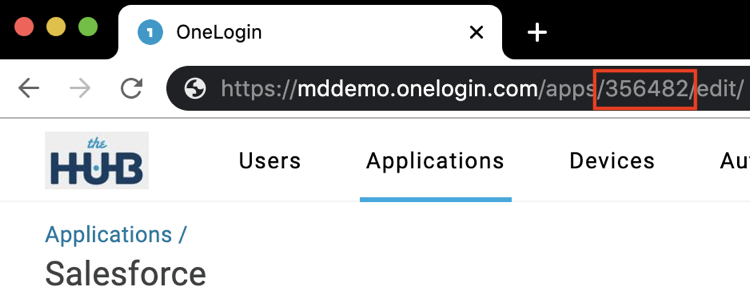
The launch link format is https://<tenant>.onelogin.com/start/<app_id>, where <app_id> is the unique identifier for the application configured in OneLogin. The <app_id> is discovered by querying the administrative API (https://developers.onelogin.com/api-docs/1/apps/list-apps) or by noting the unique identifier in the URL of the administrative UI when editing the application.
Different situations lead to any or all of the 3 generic approaches described above. The best user experience is to provide a link or tile to click (i.e. launch an IdP-initiated flow); however, support for direct application access or bookmarking/emailed links is usually required to provide flexibility - an SP-initiated flow. The challenge with the SP-initiated flows relates to how the SP determines which IdP to direct the user to for authentication - the IdP Discovery problem.
When the same applications are accessed via a Trusted IdP authentication, it becomes more complex. This document provides guidance on the different ways that applications can be launched in a Trusted IdP context and discusses how the IdP discovery problem can be addressed when an SP-initiated flow is used. Broadly speaking, target applications can be accessed in 4 ways within a Trusted IdP context:
-
Via direct application access (SP-init flow)
-
Via OneLogin Hub Portal tiles (typically a flow that combines SP-init and IdP-init flows)
-
Via IdP Portal links using
RelayStateparameter (a double IdP-init flow) -
Via OneLogin Hub Initiate URL (a custom SP-init flow followed by simple redirect)
Direct Application Access (SP-init flow)
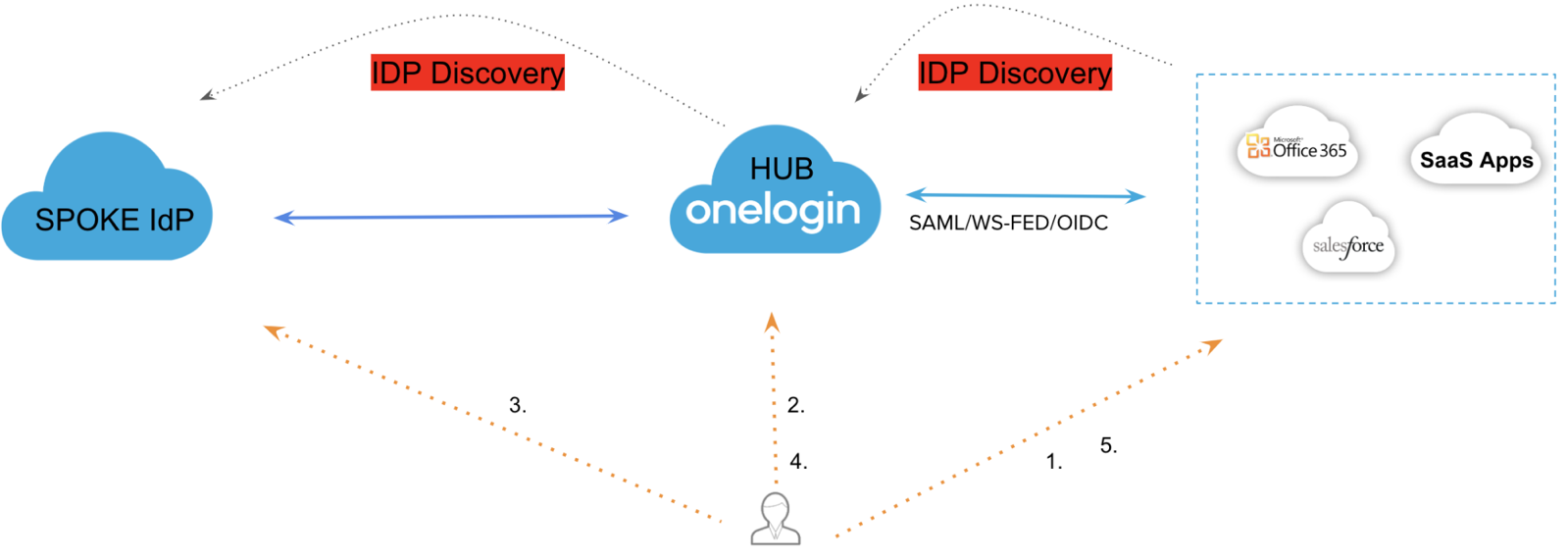
The basic flow (greatly simplified) is:
-
User invokes a URL at the target app and interacts with the SP’s authentication service.
-
Via some mechanism, the SP selects the desired Identity Provider (the OneLogin Hub tenant, in this case) and redirects the user to the OneLogin Hub along with an authentication request (via SAML, WS-Federation or OIDC).
-
Via some mechanism, the OneLogin Hub selects the desired Identity Provider (the Spoke IdP, in this case - which could be another OneLogin tenant or any other IdP). It then redirects the user to the Spoke IdP along with an authentication request (via SAML, OIDC, or OAuth).
-
Following authentication, the Spoke IdP redirects the user back to the OneLogin Hub tenant along with the authentication response.
-
The OneLogin Hub matches the response to a local user account (or provisions an account with Just-In-Time provisioning) and seamlessly redirects the user to the target SP along with the authentication response.
From a user experience perspective, the user has had to interact with 3 different login UIs with 2 IdP Discovery decisions being made. So although it is important that this approach is supported, efforts should be made to improve the user experience of this particular flow as well as to offer alternative flows that provide a more seamless experience when accessing applications within a Trusted IdP architecture.
Common IdP Discovery Approaches
The identity industry has provided many ways to solve the IdP discovery problem such that different deployments will select different approaches, as appropriate. There are 4 common types of solution that an SP could use. In brief:
-
User Interaction via UI
-
User selects a login button/image representing the desired IdP.
-
User enters an email address - which indicates the desired IdP, typically via the email domain e.g. O365 and G Suite use this approach.
-
User begins entering the IdP name, as a result of which the UI displays matches for the user to select (AJAX) e.g. Shibboleth software.
-
-
Automatic
-
Common cookie domain which is suggested in the SAML 2.0 specification (rarely, if ever, used).
-
Query each IdP in turn with a SAML authentication request (including the
isPassive=trueparameter). This approach is not sufficiently robust for general adoption,
-
-
Contextual
-
Use a custom domain for each tenant at the SP which indicates the IdP e.g. the Salesforce MyDomain feature - https://acme.my.salesforce.com where acme implies that the Acme IdP will be invoked for authentication, rather than all users accessing https://www.salesforce.com.
-
Use a custom path for each tenant at the SP which indicates the IdP e.g. G Suite uses a format like https://mail.google.com/a/acme.com, where acme.com implies that the Acme IdP will be invoked for authentication.
-
Use query string parameters to indicate the desired IdP for authentication - e.g. OneLogin supports an initiate URL where the
issparameter indicates the desired IdP that will be invoked for authentication -https://mddemo.onelogin.com/access/initiate?iss={issuer of IdP} -
Use the device type to select the desired IdP to be used for authentication e.g. mobile devices could be sent to a specific MDM for authentication.
-
-
Cookie-based
-
The SP sets a persistent cookie indicating a previously chosen IdP, which can then be used seamlessly for future reference.
-
Use an initial IdP-Init flow to transfer a SAML attribute which indicates the IdP. The SP then sets a persistent cookie indicating the IdP, as above. E.g. Salesforce uses this approach with the
ssoStartPage SAML attribute.
-
IdP Discovery with OneLogin’s Trusted IdP
When acting as the Hub, a OneLogin tenant can solve IdP discovery in five ways:
-
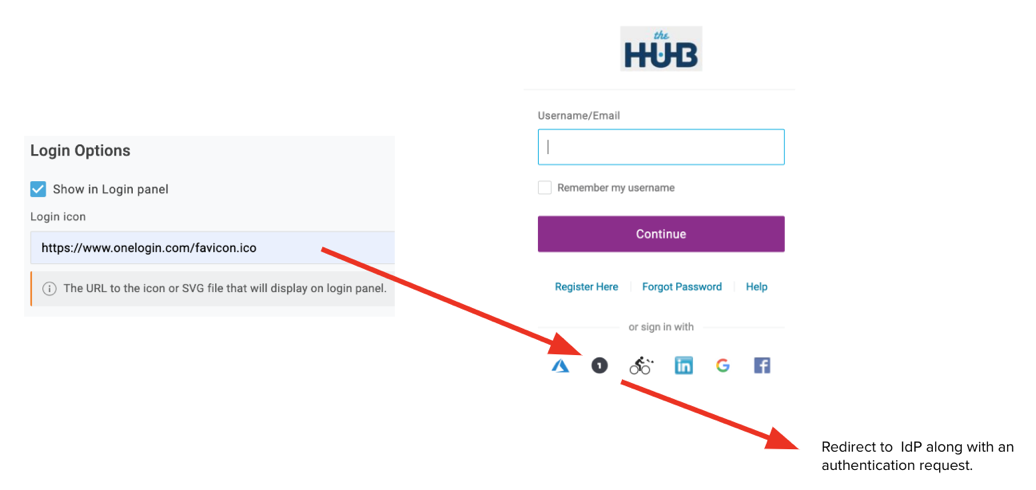
Via a login button that the user selects from the login page. The setting is defined at Authentication > Trusted IdPs > {Trusted IdP} > Login Options.
-
Via user attribute. The user provides their identifier
(username, email or sAMAccountName)during login. Instead of presenting a password prompt, OneLogin checks the Trusted IdP attribute of the user object and invokes the specified IdP. The setting is defined at Users > {user account} > Authentication tab.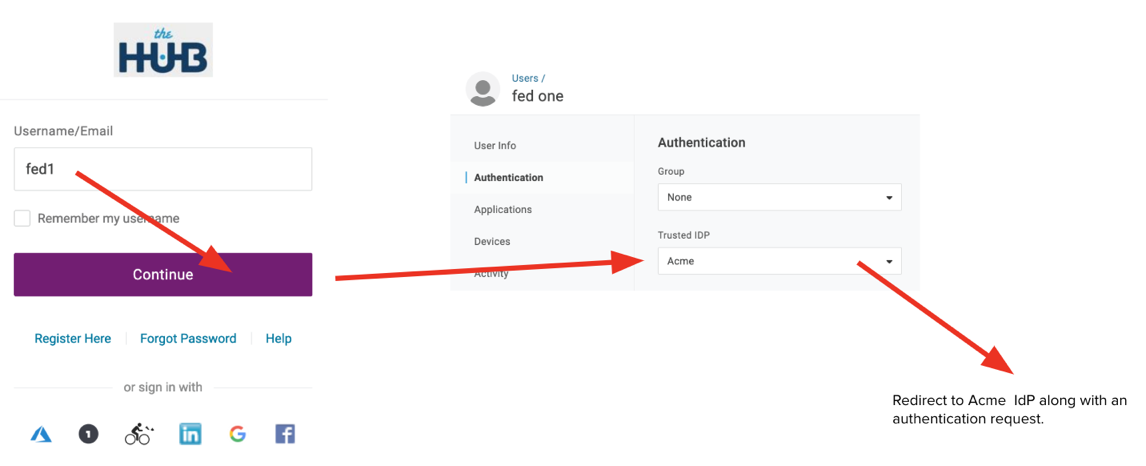
-
Via email domain. This is for situations where a local user account at the Hub does not exist. When prompting for the user identifier (which must be an email address, in this scenario), as no local account can be found, the optional Email Domains setting can be used to associate specific domains to a specific IdP. The setting is defined at Authentication > Trusted IdPs > {Trusted IdP} > Configurations > Email Domains.
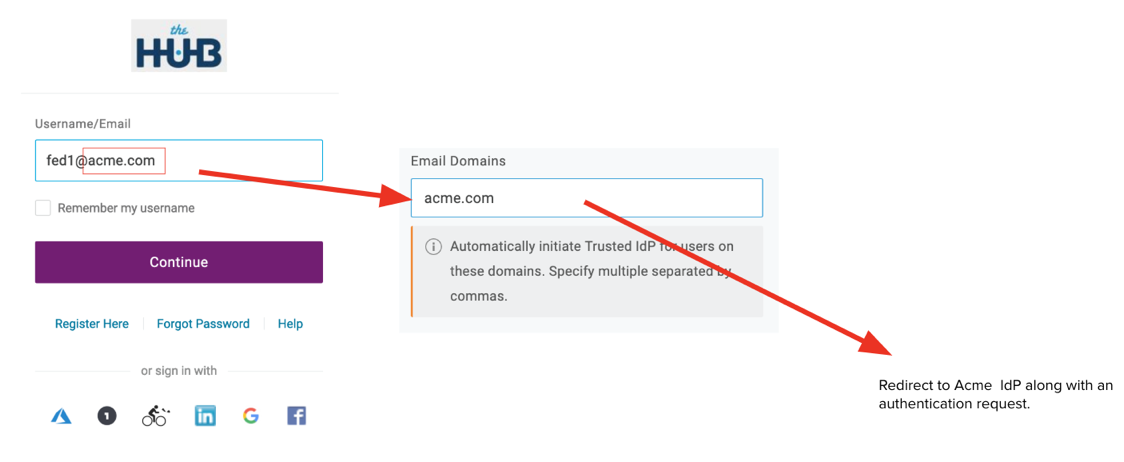
-
Via “initiate” URL. This link is designed to be invoked from any website. The link invokes an SP-init flow from the Hub to the desired IdP without any user interaction needed - the query string parameter,
iss(uer), dictates which IdP to be invoked. Additionally, a redirect URL can be defined,target_link_uri, where the OneLogin Hub redirects the user to after authentication completes, instead of loading the Hub’s portal page. That URL must be Allow listed which is configured at Authentication > Trusted IdPs > {Trusted IdP} > Third-Party Initiated Login Settings > Allowed Redirect URIs.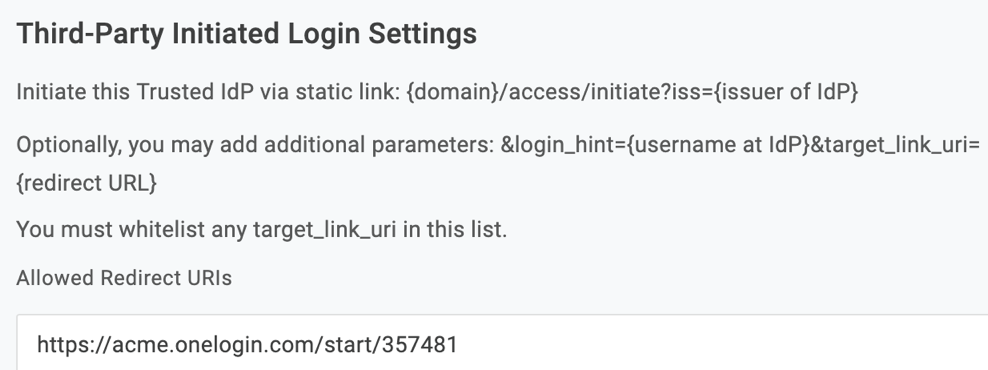
-
Via default IdP setting. This is only suitable for situations where there is a single Trusted IdP and for which there is no need to also support a local login at the Hub (as the OneLogin Hub UI is not presented to the user). It is configured at Authentication > Trusted IdPs > {Trusted IdP} > More Actions > Set as default Trusted IdP.

In addition to the five IdP discovery options, the user experience can be further enhanced for the SP-init use by avoiding repeated prompting for the user identifier at the different UIs. This is achieved by transferring the user identifier (when known):
-
From SP to OneLogin Hub. If the inbound authentication request includes a
login_hint(OIDC or WS-Federation) or SAML Subject Name ID, then it automatically populates the username field: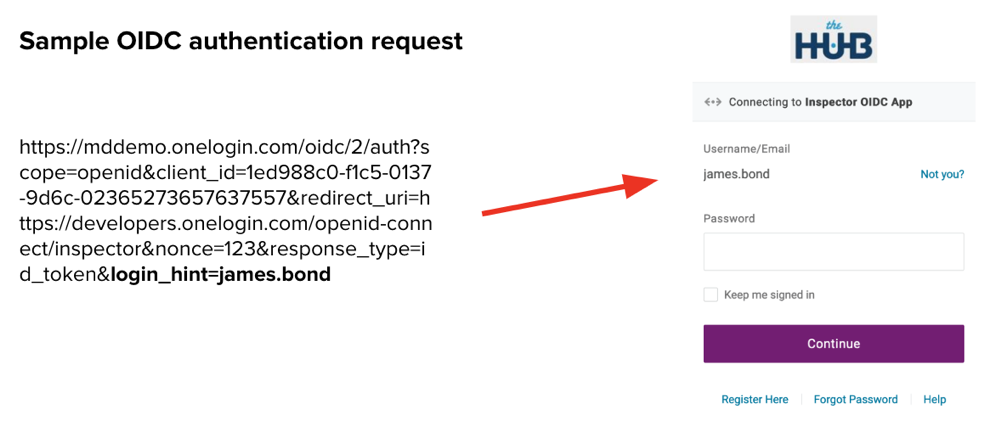
In the above example, the james.bond user defined at the OneLogin Hub did NOT have a Trusted IdP attribute set and so the Hub pre-populated the Username and presented a password prompt to the user.
-
From OneLogin Hub. In the same way, the OneLogin Hub can also pass along the user identifier to the IdP as a
login_hint(OIDC/OAuth) or SAML Subject Name ID. This is configurable via Authentication > Trusted IdPs > {Trusted IdP} > Configurations > Send Subject Name ID or Login Hint in Auth Request: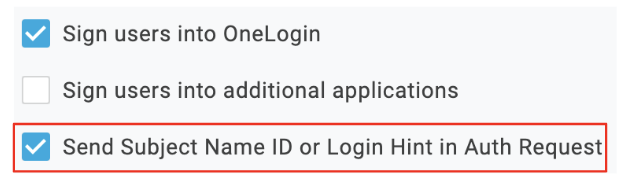
Be aware that some IdPs don’t support receiving the identifiers in this way, and may actually error. In that case, it would be necessary to disable the Send Subject Name ID or Login Hint in Auth Request option.
-
OneLogin Hub Portal Tiles (combines SP-init & IdP-init flows)
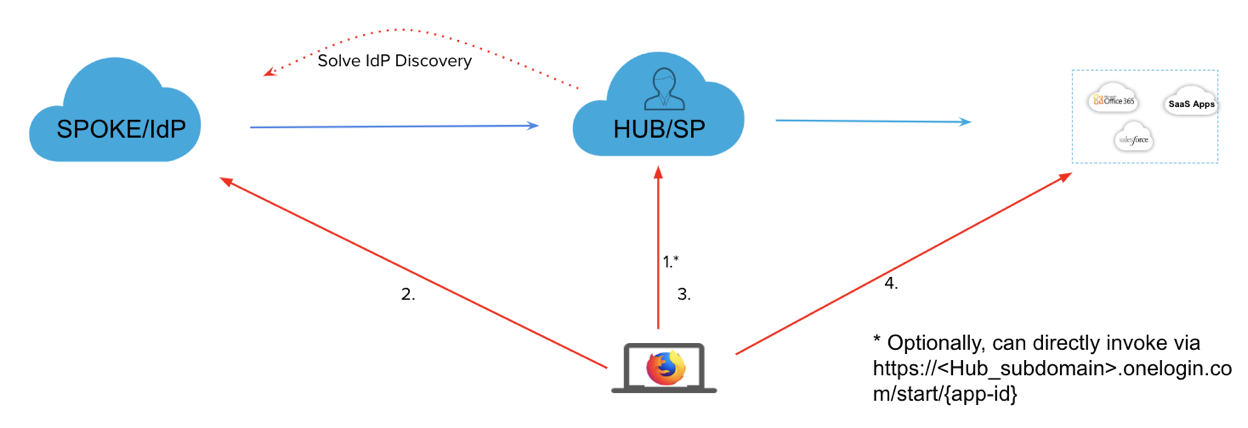
So far, this document has described how to implement direct application access via an SP-init flow, whilst highlighting how to solve the IdP discovery problem twice. If however, the aim is to simply provide published links for initial application access, then there are more streamlined approaches that are more efficient and provide a better user experience. This is the first of three such options. The diagram, below, illustrates the flow.
-
User invokes the Hub portal via a request to
https://<Hub_subdomain>.onelogin.com. -
Via one of the IdP discovery mechanisms discussed earlier, the user is redirected to the IdP (Spoke) along with an authentication request, where authentication takes place.
-
Following authentication the user is redirected back to the Hub tenant along with the authentication response. The user is then presented with the portal view containing links to the target application(s).
-
After selecting the desired application tile, the user is directed to the target application.
* Alternatively, instead of the user having to manually select the tile AFTER the TIdP flow completes, the equivalent behavior can be invoked via a direct link that automatically invokes the target app after the TIdP flow completes. The URL format is:
https://<Hub_subdomain>.onelogin.com/start/{app_id}
Where, {app_id} is the identifier for the desired app, as defined within the Hub configuration.
This mechanism is of most use when a single simple URL is required to the Hub portal where all Hub-provided services are grouped together - this link is valid for all users regardless of which IdP they belong to or whether a local Hub login is required.
Similarly, if the app-specific link is used, it is also usable by all users regardless of which IdP or local account that is used.
IdP Portal links using RelayState Param (Double IdP-Init Flow)
This approach is appropriate for SAML-only Trusted IdP configurations, although the ultimate target that is invoked can be integrated to the Hub using any supported mechanism. It avoids the IdP discovery problem entirely (twice, hence the “Double IdP-init” name) such that the only login UI that the user needs to interact with is at their home IdP (Spoke). The actual IdP portal configuration or explicit link format will depend upon the IdP that is used. However, the key element is that it relies upon the IdP including a SAML RelayState parameter that will indicate to the OneLogin Hub where the user should be directed after authentication completes.
Typically with SAML, the RelayState indicates a URL that the SP would have to Allow list to prevent malicious redirects. However, OneLogin implemented an approach whereby explicit allow-listing is not required. Instead, an APPID parameter is used which indicates a specific application to be invoked, much like the start URL format discussed earlier. No other redirects can be invoked, other than configured applications at the Hub ie.:
RelayState=APPID=<app_id>
Where <app_id> is the unique identifier of the app to be invoked. URL encoding (%3D is the encoding for “=”) should also be used for the value. So for example,
RelayState=APPID%3D123456
Be aware that some IdP implementations may only support fully qualified URLs as a RelayState (although this is not mandated in the SAML specifications), in which case this approach will not work for such providers. See the final “Initiate URL” mechanism for an alternate approach.

The generic flow is as follows:
-
Having already logged into their home portal, the user clicks on the desired application link that invokes an IdP-init flow to the OneLogin Hub.
-
The IdP redirects the user to the Hub along with a SAML response. The Hub matches the response to a local account (or JIT-provisions an account). The RelayState’s APPID value that is also received is then checked against the configured applications at the Hub.
Note: If no
RelayStateis included, the Hub will simply present its own portal view. -
Assuming the APPID matches an application (for which the user has been granted access), the Hub will further redirect the user to the indicated application using whatever protocol that is configured for that application.
If a OneLogin tenant is also used at the Spoke/IdP….
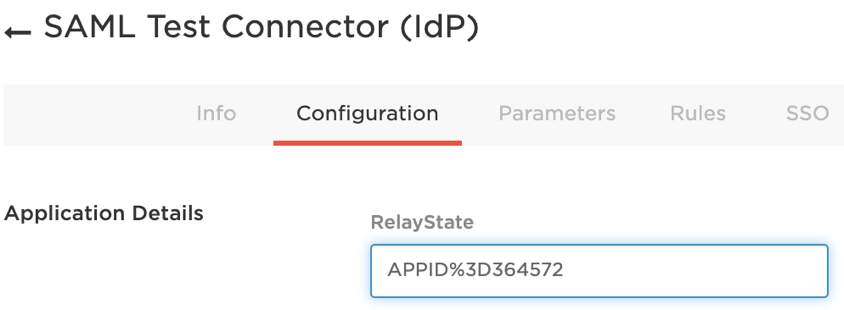
In this case, the SAML app defined at the IdP/Spoke (that represents the Hub) could be modified with a RelayState value of “APPID%3D<app_id_of_target>” as per screenshot:
Of course, this is only suitable for directly invoking a single target app. If the Hub is offering several target applications then we need a way to invoke the one SAML connection to the Hub whilst passing in the application-specific RelayStates.
The easiest way to do this is to simply add QuickLink applications from the catalog where the full URL is defined. This URL can also be bookmarked or invoked from any other website where application launch links are located.
The format of the URL would look like:
https://<spoke_tenant>.onelogin.com/start/<app_id_of_Hub>?RelayState=APPID%3D<app_id_of_target>
OneLogin Hub Initiate URL (Custom SP-Init Flow + Simple Redirect)
This approach is suitable for deployments where a direct app-specific link is required but the SAML IdP does not support the RelayState format used by OneLogin (defined in the previous section).
It is also useful to support non-SAML Trusted IdP scenarios which don’t have the concept of a RelayState, nor indeed the concept of an IdP-init type flow.
The basic link format is:
https://<Hub_subdomain>.onelogin.com/access/initiate?iss={issuer of IdP}
By itself, this link will automatically invoke the indicated IdP and, following authentication, will present the Hub's portal from where the user is free to select the application link(s) required. In other words, the request itself has solved the IdP discovery problem.
However, the link can be modified to include a redirect to a desired application and so not only select the authenticating IdP but the ultimate target application as well. This is achieved by adding the following to the link:
target_link_uri={redirect URL}
For example, if you wished the redirect URL to be used to invoke an IdP-init flow to a target application, then the start url format could be used as discussed earlier e.g.
https://<Hub_subdomain>.onelogin.com/access/initiate?iss={issuer of IdP}&target_link_uri=
https://<Hub_subdomain>.onelogin.com/start/<app_id>
Finally, if the user identifier is already known then the link can be further modified to send the desired identifier to the Spoke/IdP to further improve the user experience by avoiding the need for the user to provide the identifier during login. This is achieved by adding the following to the link:
&login_hint={username at IdP}
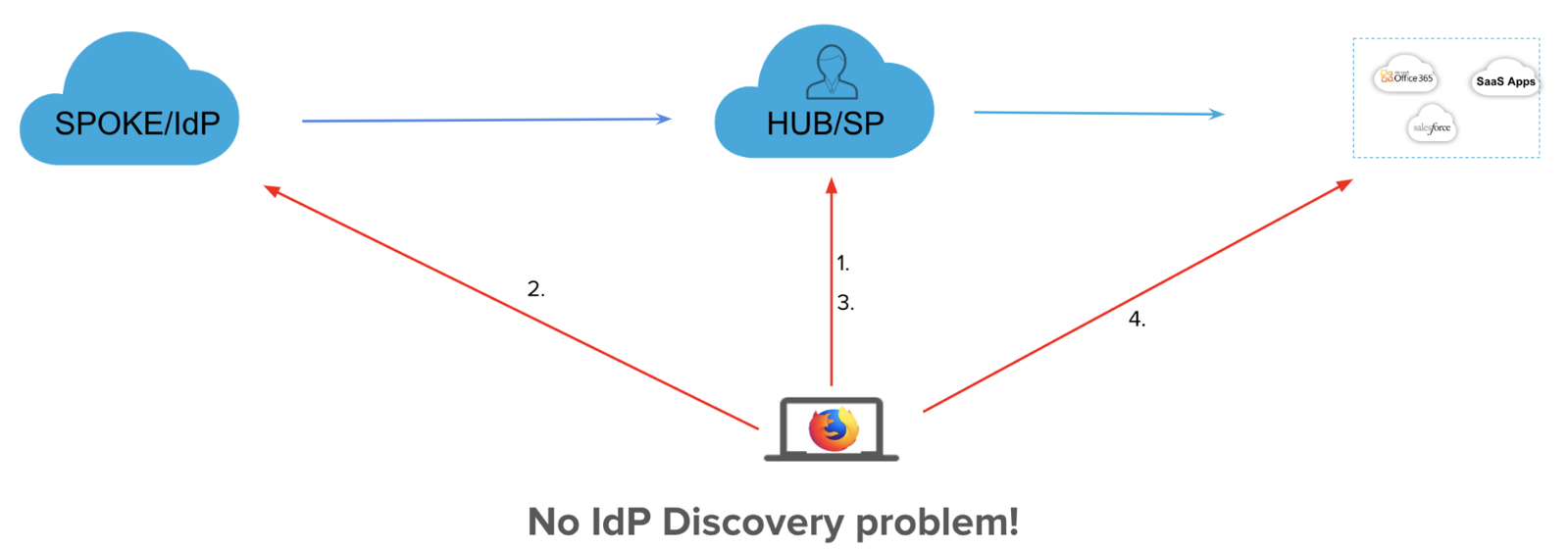
Two examples of the above flow are described here:
Typical SAML TIdP Flow to Launch an app
-
User selects the link (which could be hosted anywhere) and so invokes the OneLogin Hub’s “initiate” URL. The link informs the Hub tenant of which IdP to invoke and which target URL to send the user to after authentication completes.
-
User is automatically redirected to the Spoke/IdP along with the authentication request.
-
Following authentication, the authentication response is received at the OneLogin Hub tenant.
-
The initial
target_link_uriparameter is then used to invoke the desired URL which in this case will be an IdP-init URL to invoke the target application.
Typical OIDC TIdP Flow to Invoke a Social Login from a CIAM Portal
-
User selects a Facebook/Google/LinkedIn login link from the customer’s CIAM portal which results in a request to the OneLogin Hub’s “initiate” URL.
-
User is automatically redirected to the desired Social Provider along with the authentication request.
-
Following authentication, the authentication response is received at the OneLogin Hub tenant.
-
As OIDC does not support an IdP-init type of flow. The
target_link_uriparameter would need to invoke a URL at the CIAM portal which will automatically invoke an OIDC authentication to the OneLogin Hub. As the user is now just authenticated at the Hub, a seamless SSO is achieved.
Each link is specific to an IdP i.e. the primary aim of a link is to launch an authentication request to a specific IdP (and so automatically avoid the IdP Discovery problem). But because it also supports a redirect URL to invoke a specific target page following authentication it can be used to launch specific application URLs.
Note: this link format can typically also be used as the SSO URL within SaaS application configurations. For example, within Google 3rd party IdP configuration settings, using this URL format for the Sign-in page URL will cause google to issue SAML authentication requests appended to that URL. OneLogin will ignore the SAML request and simply act upon the iss and target_link_uri parameters to provide per-app-based IdP routing. This converts an SP-init request to an IdP-init flow, with a minor risk that SP context such as RelayState could be lost.
Summary
|
Direct URL Access |
Hub Tile |
IdP Portal Link (RelayState) |
Hub Initiate URL |
|
|
URL format |
Any URL for the target app |
Internal, but equivalent to https://<Hub_subdomain>.onelogin.com/start/<app_id> |
Depends on IdP. For OneLogin IdPs, https://<IdP>.onelogin.com/start<Hub_app_id>? RelayState=APPID=<app_id> |
https://<Hub_subdomain>.onelogin.com/access/initiate?iss={issuer of IdP}&target_link_uri=https://<Hub>.onelogin.com/start/<app_id> |
|
# of Login UIs |
3 |
2 |
1 |
1 |
|
# of IdP Discoveries |
2 |
1 |
0 |
0 |
|
User Experience |
Poor due to # of UIs to traverse |
2-step process. Need to login to access Hub portal and then separately invoke the desired tile. Alternatively, if “start”url originally invoked, the redirect to the app is automatic. |
Excellent, as after accessing their own IdP’s portal/launchpad, a single click gives access to the desired app, seamlessly brokered via the Hub. |
Excellent - same as IdP Portal Link. |
|
Efficiency |
Low. With SAML, 2 requests and 2 responses |
Low, if the aim is simply to invoke a specific app. However, if the user normally accesses the Hub portal and wants to use it as a launchpad, then efficiency is good. |
Excellent. With SAML, no authentication requests, just 2 response messages (IdP>OL and OL>SP) |
Good. With SAML, there are 2 response but one request, although the iss(uer) parameter auto-selected the IdP and so the user did not need to solve IdP Discovery |
|
When to Use |
When the user needs to select a specific app url via a bookmark/email link, for example. |
For users who desire to have a separate portal experience from their own IdP’s portal in order to launch various Hub-based apps. For situations when a single application-specific link is needed that is suitable for all IdPs or local Hub account users. |
For SAML-only Trusted IdPs, although the target application can integrate with the OneLogin Hub using any supported mechanism. When customers want the best user experience with simple launch links from their own portal. |
As with the IdP Portal link, when customers want the best user experience with simple launch links from their own portal BUT who’s SAML IdP does NOT support the RelayState format that OneLogni requires (e.g. Ping requires RelayStates that are absolute URLs). Also useful for OIDC/OAuth TIdPs which don’t have the concept of Intersite Transfer URLs. Custom portals can advertise Social Provider links brokered via OneLogin. |