This knowledge base article explains how to synchronize the PwdLastSet time from Active Directory to OneLogin.
Note: you must be running ADC version 5.1.4 or newer, and you must remote in to each system.
Active Directory
Remote in to each system and perform the following steps in sequence.
- Run Notepad with Administrator privilege
- Go to File > Open > C:\Program Files (x86)\OneLogin, Inc\OneLogin Active Directory Connector\ConnectorService.exe.config
- Scroll down to the OneLogin.Enterprise.Connector.Properties.Settings tag
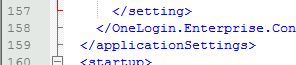
Insert a new line above the and paste in the following lines, ensuring you begin and end each line with < and end with >:
setting name="SpecialDirectoryAttributes" serializeAs="Xml"
value
DirectoryAttributeFormatCollection xmlns:xsi="http://www.w3.org/2001/XMLSchema-instance" xmlns:xsd="http://www.w3.org/2001/XMLSchema"
DirectoryAttributeFormat Name="pwdLastSet" Syntax="Int64" Format="DateTime" FormatStyle="yyyy-MM-ddThh:mm:ss.fffZ" /
/DirectoryAttributeFormatCollection
/value
/setting
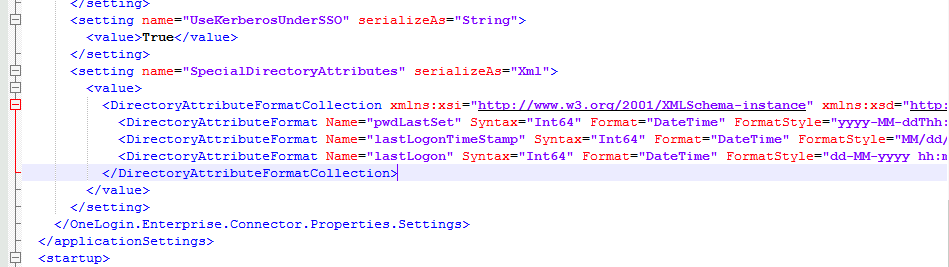
- Save and exit, then restart your OneLogin ADC service
OneLogin
- Open OneLogin as an administrator and navigate to Custom User Fields
- Create a new field for the friendly PwdLastSet attribute from Active Directory

- Copy the short name value to your clipboard for the next step, then click Save.
- Navigate to User Mappings and create a new mapping using the following concepts, adjusting the names to match what you chose for the name in the previous step
- Conditions
- PwdLastSet Friendly does not equal [blank value]
- Actions
- Password changed at… > {custom_attribute_pwdlastsetfriendly}
- Conditions
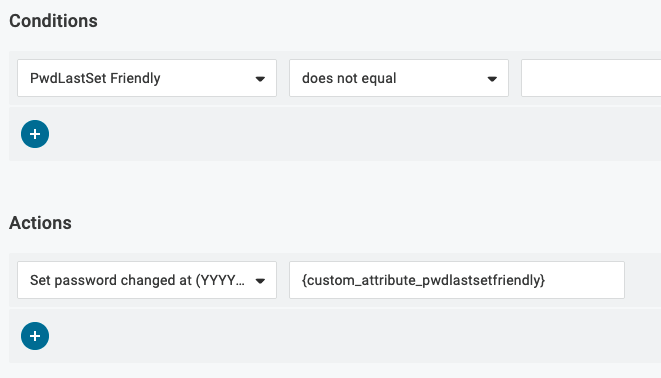
Note: The short name you copied to your clipboard is pasted after the prefix {custom_attribute} and ended with the right curly-brace.
- Navigate to Active Directory settings, then go to Users > Directories, click on Active Directory, and choose Directory Attributes.
- Add PwdLastSet as a new attribute and save it to the OneLogin Custom User Field you defined previously

When you click save it will sync and update all your users and the mappings will instantly update any users that have unsynchronized or disparate password last changed times.