OneLogin offers a variety of tools to explore! This document covers just some of the functions that can help you make the most of your OneLogin account.
Events
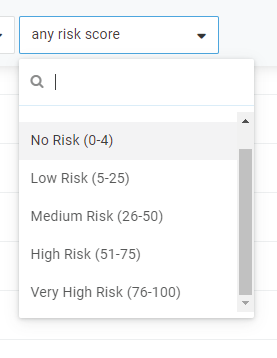
The Events log monitors everything that happens within your organization's OneLogin, from individual user actions to administrative operations, provisioning, and MFA device registration. By going to Activity > Events in your admin portal, you can filter for events by user, event type, status, or risk score.
If you have Smart MFA and/or Smart Access enabled, the risk score is calculated from a variety of factors such as location and IP address, assigned a score on a scale of 0-100, and sorted into five levels: No Risk, Low Risk, Medium Risk, High Risk, and Very High Risk. Without Smart MFA or Smart Access, the filter is still present on your Events page, but risk scores are not calculated, and the risk filter will not return any results.
Related Documentation:
Reports
Account owners and Super users can run any of OneLogin’s standard set of reports under Activity > Reports in your admin portal. If your current OneLogin subscription supports it, you can customize these reports and create new ones from scratch.
There are four basic report types, from which custom reports can be created:
- User Details: Shows users and details about groups, directory, authentication factors, last login, etc.
- App Details: Shows applications, their settings, role memberships, users, etc.
- Events: Shows failed sign-ins, user creation, all data related to an organization's access policy, including “last accessed” or “last login” data.
- Login Details: Shows user logins for all applications, including usernames, password strength, etc.
Related Documentation:
Notifications
Five notifications are enabled by default:
- Notify account owner of locked user
- Notify group admin of locked user
- Notify user of unlocked account
- Notify account owner of certificates about to expire
- Notification for broken provisioning apps
You can edit existing notifications, and create new ones, in the Activity > Notifications section of your admin portal. Notification emails are styled according to the email template you configure on the Settings > Branding page.
Related Documentation:
Jobs
OneLogin makes monitoring background jobs a simple process. From the Activity > Jobs section of your OneLogin portal, you can view or stop in-progress background jobs. Background jobs include provisioning tasks, applying and reapplying mappings, directory synchronization, and bulk operations like user activations and forced password resets.
Related Documentation:
Delegated Administration
The Delegated Administration add-on allows you to customize and grant granular administrative privileges to users, delegating simpler tasks to the appropriate personnel or even outsource to partners. This saves your organization time and money by creating the "principle of least privilege," where users only have access to the specific administrator privileges necessary for their job function.
Related Documentation:
Conclusion
This series covers the basics, but we offer plenty of of other tools, tricks, and troubleshooting for you to check out!